The essence of Keyword Harvesting is simple: an automatic campaign in Bol collects data about which search queries customers use, and as soon as a search term has proven to be good enough, it’s automatically passed on to your manual campaigns. There you have full control over the bid and the targeting. Adyard sets up this structure for you and maintains it daily.
The automation runs every day at 17:00.
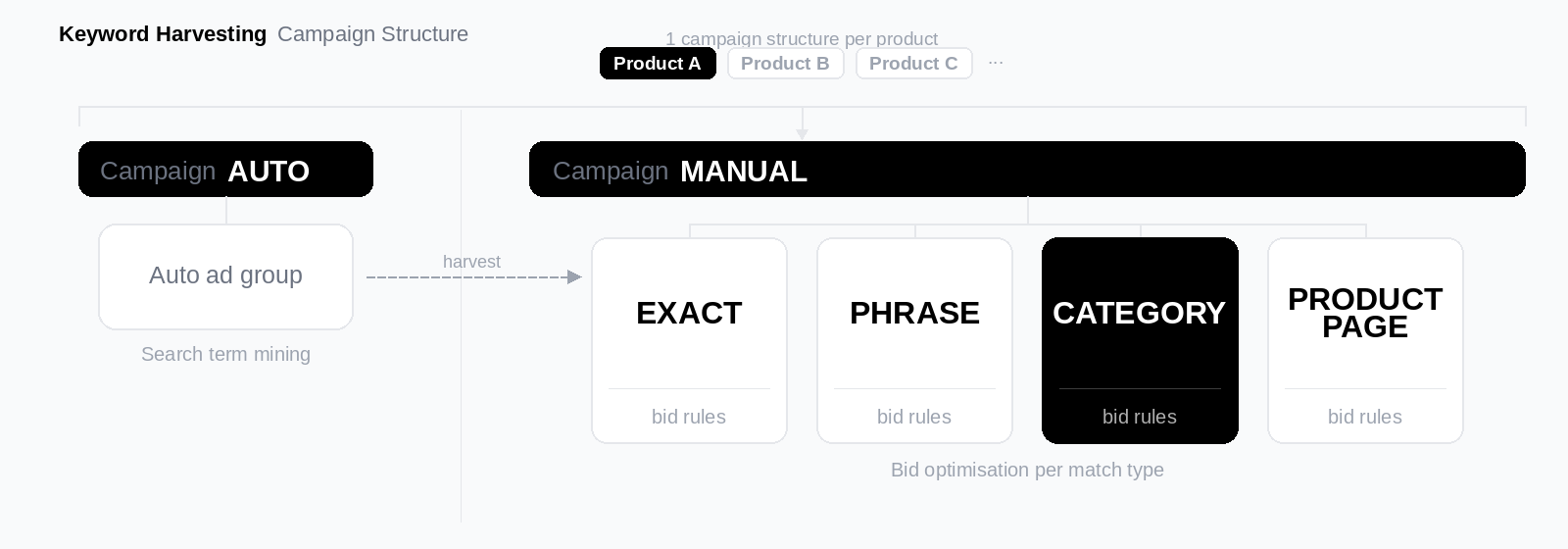
You don’t need to build a campaign structure yourself in Bol. When you create a new campaign group in Adyard and select your products, Adyard automatically builds the full structure for you. The right campaigns, ad groups and negative keywords are created in Bol right away and are ready to go immediately.
What you set yourself are the settings of the campaign group: your budget, start date, target ACOS and the threshold values that determine when a search term is good enough to be forwarded. After that, Adyard takes over.
For each campaign group, Adyard creates a layered structure that’s designed to discover keywords, validate them and then use them as efficiently as possible.
The automatic campaign lets Bol decide which search queries you’re shown on. You don’t provide any keywords yourself. This is your discovery campaign: here you collect data on what customers search for and what actually converts.
The manual campaigns consist of a phrase campaign and an exact campaign. This is where the winning search terms are sent as soon as they meet your set threshold values. In the manual campaigns you have full control over the bid per keyword and the targeting is more precise.
The three campaigns work like a funnel. The automatic campaign discovers, the phrase campaign refines, and the exact campaign converts as efficiently as possible.
From the automatic campaign
A search term that performs well is added at the same time as a phrase keyword to the phrase campaign and as an exact keyword to the exact campaign. At the same time, the system adds the search term as a negative keyword to the automatic campaign. This way that campaign stops bidding on that query and all traffic is sent to the manual campaigns.
From the phrase campaign
A search term that performs well in the phrase campaign is added as an exact keyword to the exact campaign. To prevent the phrase and exact campaign from competing with each other on the same query, the search term is also added as a negative exact keyword to the phrase campaign and as a negative phrase keyword to the exact campaign.
The system checks every search term based on the last 7 days. A search term is only forwarded if all of the following conditions are met:
The ACOS of the campaign the search term comes from is at or below your set max. ACOS.
The search term has reached enough clicks, at least the number you set as the click threshold.
The ACOS of the search term itself is at or below your set max ACOS.
The search term has achieved enough conversions, at least the number you set as the relevance threshold.
The search term doesn’t yet exist as a keyword in the target campaign.
If a search term doesn’t meet one of these conditions, it’s skipped and evaluated again the next day.
For every new keyword, the system calculates a starting bid based on the performance of the search term. The calculation works the same way as the Bid Optimizer: the system looks at the loss or profit compared to your target ACOS and translates that back into a suitable opening bid.
If the calculation doesn’t produce a reliable bid, the system falls back to the average CPC of the search term. If that’s also not available, the default bid of the ad group is used.
The starting bid is always limited by your set min CPC and max CPC.
As soon as a keyword is added to your manual campaigns, the job of Keyword Harvesting is done. From that moment on, you can let the Bid Optimizer adjust the bid based on the actual performance of that keyword.
To do this, link a ruleset to your manual campaigns. The Bid Optimizer will then pick up the keywords every day that have collected enough data and adjust the bids towards your target ACOS. This way the whole cycle is automated: from discovery via the automatic campaign, to validation via the thresholds, to daily optimization via the Bid Optimizer.
You set these values when creating your campaign group. They determine how selective Keyword Harvesting is when forwarding search terms.
Max. ACOS - the threshold under which a search term is considered profitable, both at campaign level and at search term level.
Click threshold - the minimum number of clicks a search term must have before it qualifies. Setting it too low means the system reacts to randomness. For most categories, a threshold between 5 and 15 clicks works well as a starting point.
Relevance threshold - the minimum number of conversions a search term must have achieved. This prevents adding search terms that do get clicks but don’t convert.
Min. CPC and max. CPC - the boundaries within which the starting bid for new keywords is calculated.
